Building with Amazon Bedrock: A Product Manager's Journey
Calling foundation models through the Bedrock API with fewer than 100 lines of Python, then wrapping them in a Streamlit front end.
I recently completed Lee Assam’s course Learning Amazon Bedrock, and it was a real eye-opener for me as a product manager. Amazon Bedrock is a service from AWS that allows users to integrate and scale generative AI with ease. Think of it as the tooling and infrastructure that lets you plug in a wide range of powerful Gen AI models without the need for complex development processes. It’s like being handed the keys to the kitchen with a message to “bake something fun.”
Having fun here does require some developer skills – something I don’t quite have on my own. However, the world has changed, and now I have a brilliant co-intelligence to help me where I struggle: ChatGPT.
After successfully setting up my AWS account and user profiles – a notably smooth onboarding process – I struggled to activate the models. It took several days and running an ICS instance to “wake” everything up. Bedrock offers access to many foundational models from top providers such as Anthropic, Cohere, Meta, StabilityAI, as well as their native options, Titan and Nova. Naturally, they don’t have Google’s Gemini or OpenAI’s ChatGPT on demand – though services like Hugging Face can help access these via AWS.
APIs All the Way Down
One thing that stood out to me is how Bedrock makes it simple to access foundation models via an API. The course is specifically for developers but is simple and well explained, most steps are easy to follow. However, since its launch, several code libraries, formatting rules, and webpage URLs have changed. A developer could have solved these issues independently but for me simply copying the code didn’t work. ChatGPT proved invaluable in debugging, guiding me step-by-step through each error.
We called the Bedrock API by running Python code from a GitHub Codespace. With fewer than 100 lines of simple (ChatGPT-edited) code, I was talking to Claude via Bedrock’s API. A magic moment.
There’s no complex setup or heavy-handed dependencies – just a clean, intuitive way to build connections to generative AI. You can easily mix and match models based on what works best for your use case. Need conversational AI? Claude Sonnet or Mistral have you covered. Require enterprise-grade translations? Cohere pour toi. Need images? StabilityAI delivers. Are costs important? Claude Haiku might be your best bet. Bedrock keeps your options open.
From a business perspective, whether your use case involves handling customer queries, summarising documents, or generating creative content, you can rely on Bedrock’s versatility to adapt to your needs.
Show Me don’t Tell Me
As a PM, I’m always looking at how tools can help teams deliver better products faster. Bedrock is a good example of this, it is a technical space, but easier to navigate than Google Console for example. Without ML engineers you can have real LLM API calls on production sites. This is not how things have always been!
Speaking of good tools, integrating these models with Streamlit for the UI was a surprising treat. Streamlit makes it remarkably simple (and free!) to create clean, interactive front ends that look like you spent hours building them. In reality, it too was fewer than 100 lines of simple Python code. The tool’s drag-and-drop widgets and dynamic updates let you iterate quickly and focus on building an interface that resonates. For someone like me, who is by no means a front-end expert, that’s a big deal.
One More Step: RAG
So far, we’ve built a nice UI that calls a foundational model via an API. Technically impressive, but not super useful without context.
A Retrieval-Augmented Generation (RAG) system combines generative AI models with a retrieval mechanism that pulls relevant, real-time information from a predefined dataset or database. This ensures that responses are contextual and grounded in reliable data. It forces the model to “check the recipe” rather than just baking an answer from its existing knowledge.
Image from here

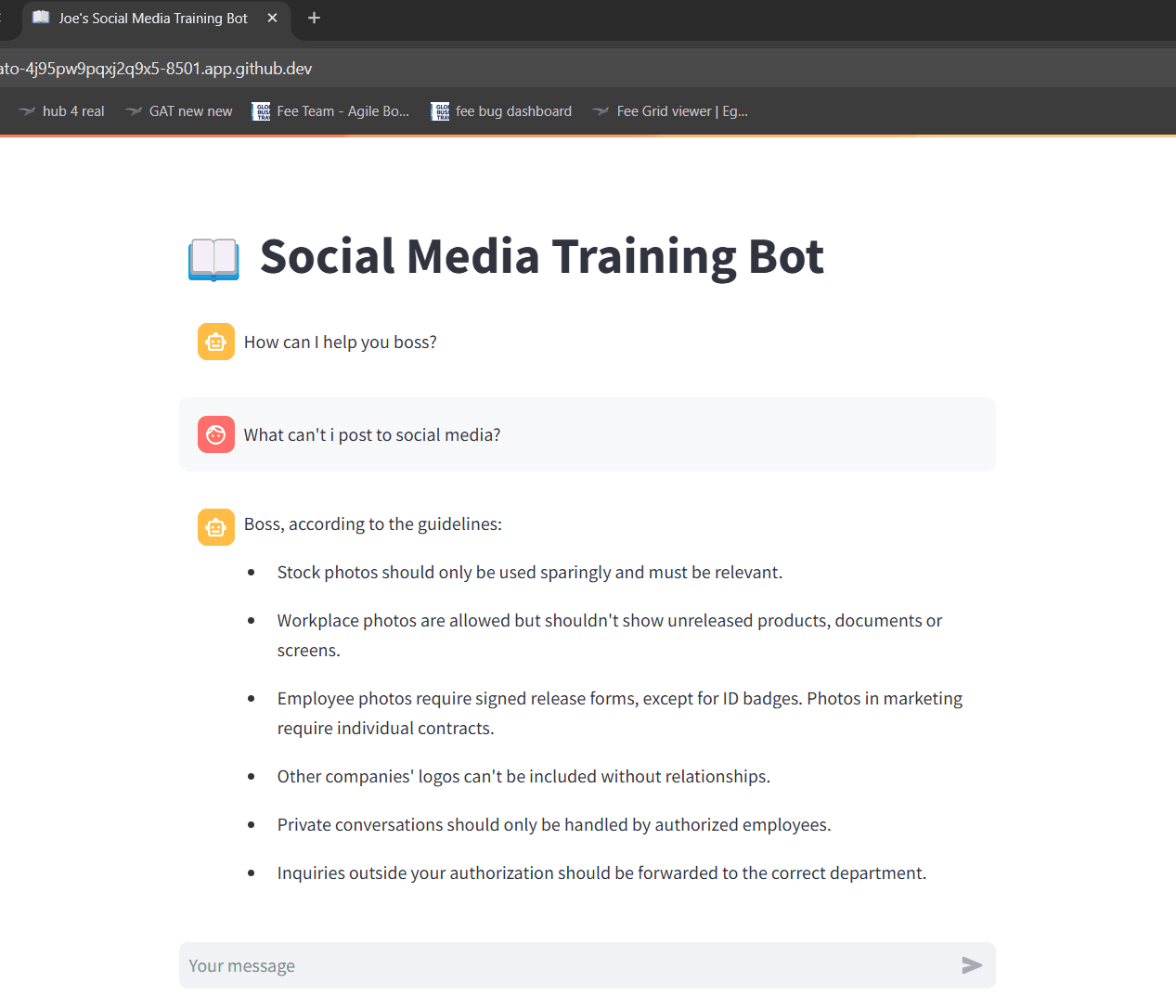
For example, we added a PDF “Social Media Policy” document, and you could see the responses were grounded in the document while still being generated by Claude in direct response to the query.

Yes I made my bot call me “Boss”. I need that kebab shop validation.
While functional, this application isn’t a final product. It lacks guardrails; for example, you can easily get it off-topic by asking about dinosaurs

Takeaways
By the end of this course, I had launched a Retrieval-Augmented Generation (RAG) enhanced chatbot with a slick UI that genuinely works. It’s more than just a prototype; it’s something you could show stakeholders or even deploy for real users.
So what does this all mean? For me, it’s been a reminder of how accessible cutting-edge technology has become. As product managers, we’re no longer bound by the limits of what our engineering teams can build from scratch. We’re stepping into an era where tools lower the barriers to innovation, letting us focus on solving real user problems. It’s pretty amazing to know I can take an idea, spin up a working AI app, and ship something useful, all without a PhD in machine learning or even a 101 in Python.
Things are moving fast, and the gap between idea and execution is shrinking. It’s never been easier to build. In the short to medium term, AI-enhanced people are entering a golden period. In the longer term, though, I wonder how long they’ll stay in the loop.